Volume Profiles
For data in table format, we recommend using CP Planning - Asset View or CP Planning - Package View
Volume Profiles show total volume delivered for the selected period.
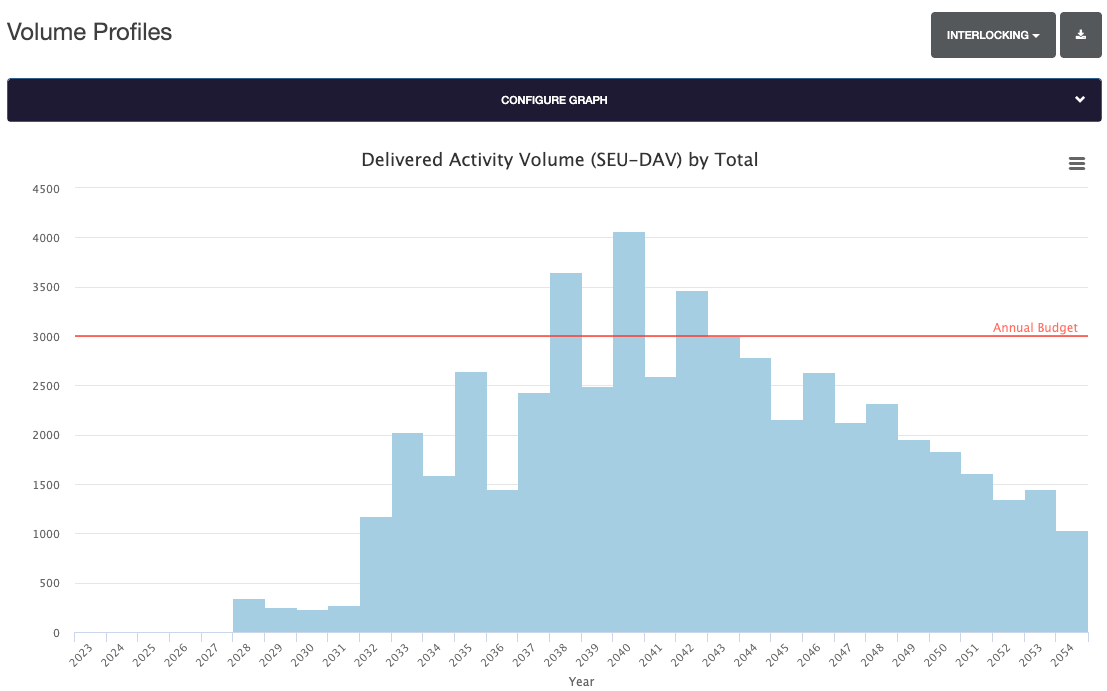
Clicking on any bar in the chart will display a breakdown of volume.
Asset Type Selection
The volume profiles graph is configured by default to show Interlocking data only.
This can be switched by selecting the Asset Data box and selecting either Interlocking or Level Crossing.
Graph Configuration
The graph can be configured by selecting the Configure Graph header bar.
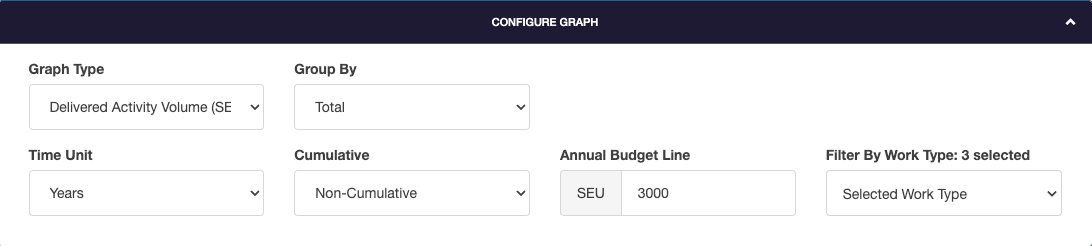
Graph Type
There are four different types of graph that can be viewed. This setting can be switched by selecting the Graph Type dropdown box.
- Accrued Activity Volume (SEU-AAV)
- Count Affected Volume (SEU-CAV)
- Delivered Activity Volume (SEU-DAV)
- Technology Composition
Group By
The group by option allows the graph grouping to be adjusted. This features groupings for Workbank, Areas or Category Schemes.
Time Unit
The time unit for the graph can be displayed in three different ways:
- Years
- Control Periods
- Periods
Cumulative
Cumulative sets if the graph is shown as cumulative, or non-cumulative data.
Annual Budget Line
Annual Budget Line allows the annual SEU budget to be defined. This is displayed as a reference line on supported graph types.
Filter By Work Type
Filter By Work Type allows a filter to be applied to the data.
To include a new work type, toggle the slider switch to on then click Apply.
To remove a worktype, untoggle the slider switch.
Exports
To create an export, select the Export button.
The Volume Profile data can be exported in three different formats.
- CSV
- Excel, one tab per REGION
- Excel, one tab per ROUTE