Indexes
Indexes can be viewed by selecting any interlocking from the Main Dashboard view.
Create A New Index
From the Interlocking View, select the Create New Index button.
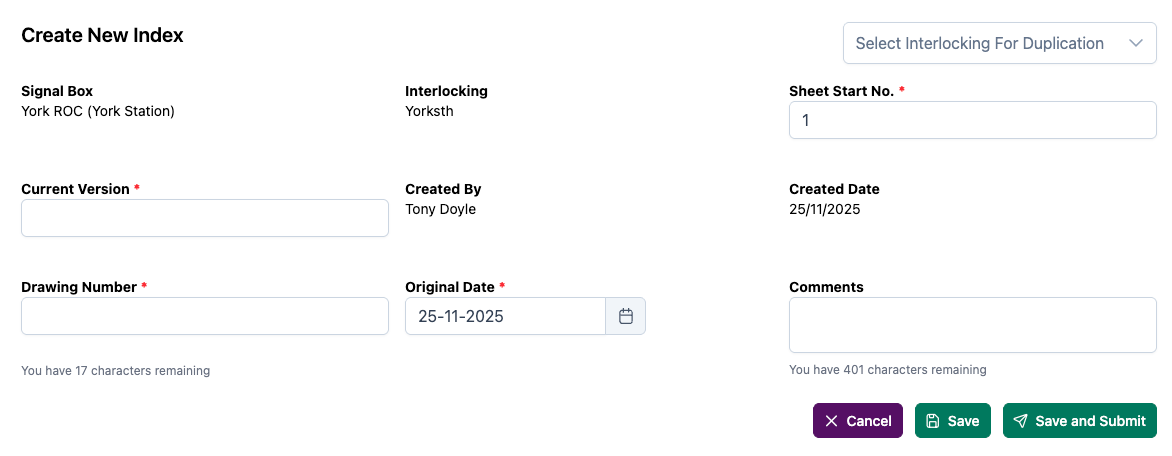
Enter the Current Version, Drawing Number, Original Date and any comments then click Save to continue.
Save and Submit will generate an error as no Route Cards have been created.
Duplicate Existing Index
Index can be copied from other Interlockings.
To select an Interlocking to duplicate the index from, select the Select Interlocking for Duplication dropdown, then choose the interlocking.
This will pre-fill all of the required information.
Editing An Index
From the Interlocking View, select the index to be edited. On the index view page, select the Edit Index icon.
Make any changes required, then select the save icon.
Indexes cannot be submitted until at least one Route Card has been added
Viewing Indexes
Previously created indexes can be viewed from the Interlocking View.
A table is displayed with the index information, along with its current status. This can then be viewed by selecting the View Index link.
