Admin Dashboard
This page is only relevant for users with the Admin permission.
The Admin Dashboard can be accessed by selecting Admin Dashboard from the account menu.
The dashboard consists of two options.

Add New User
The user must be added in Auth Service before they can be added to NSRL.
To add a new user to NSRL, select the Add User to NSRL button.
A new modal will load to select the user to be added.
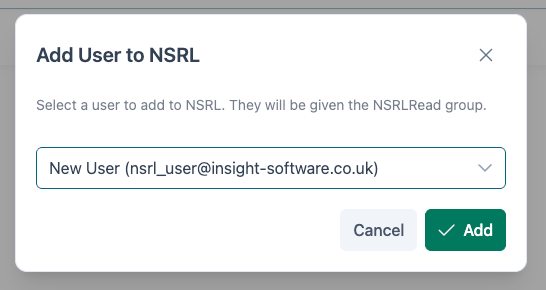
The user can be selected by scrolling, or entering a search term to filter the results. Once the user has been found, click on the record to edit their permissions.
When the user is created within NSRL, they are automatically granted the Read Access permission only. The process to edit user permissions is outlined below.
Edit Existing User
To edit an existing user, click on the Edit Existing User dropdown.

The user can be selected by scrolling, or entering a search term to filter the results. Once the user has been found, click on the record to edit their permissions.
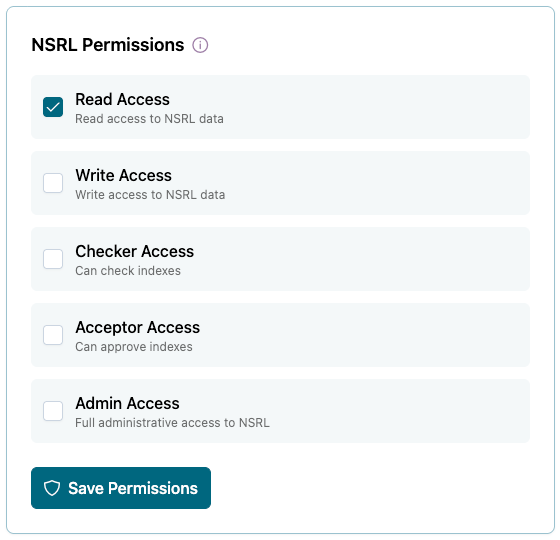
Toggle the checkbox next to the relevant user permission(s) then click Save Permissions.
IRSE License
Only users with Checker Access require an IRSE License to be entered
IRSE license information can be entered when editing a user.
Enter the users IRSE License Number, Surname and the Expiry Date of the license. Without this, they cannot complete any Index Checks.
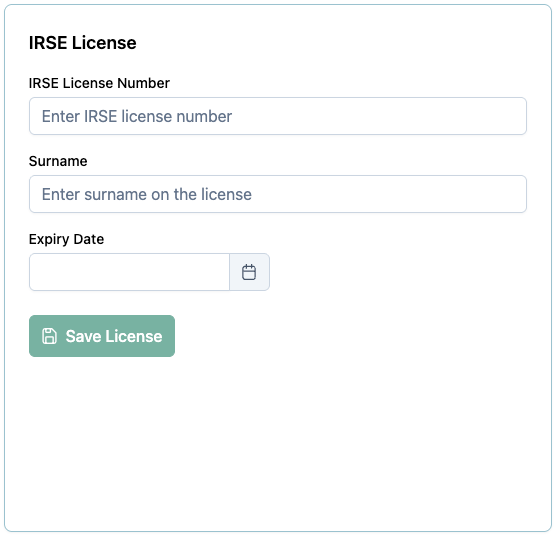
Once the information has been entered, click Save.