Upcoming Assessments List
Upcoming Assessments List View
The Upcoming Assessments list is the main view displayed when logging in to TICA. It shows the sites and assessment dates available to the current user.
The list includes Site Name, Site Code, Route, ELR, Primary Group, Year, Next Assessment, Last Assessment, and Actions. Select Columns to show or hide available fields.
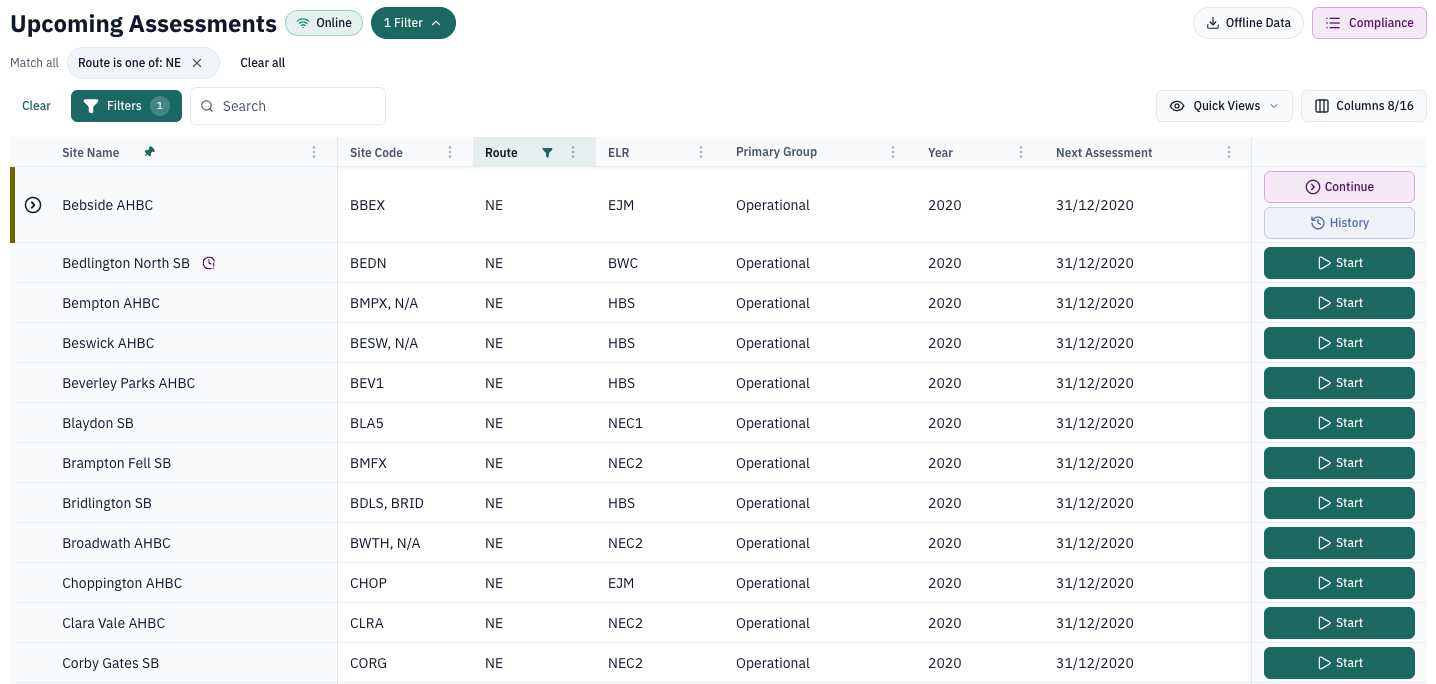
The list can show 20 records at a time. Use the pagination controls or the rows-per-page selector to move through the results.
Search
Use the search bar to find a site by entering a keyword or phrase. The search is applied as text is entered.
View filters
The route filter is applied automatically when TICA opens. In the example local session, the list opened with the route set to NE.
Select Filters to add further field filters or sorting rules. The filter builder supports field filters, filter operators, and multiple sort fields.
Select Quick views by status to filter the list by:
- In Progress
- Awaiting Approval
- Changes Requested
The list also provides route-level compliance metrics and offline access.
Start or continue an assessment
Select Start beside a site to set up a new inspection. Sites with an assessment in progress show Continue and History actions instead.
The site name opens the linked asset record in DataStore.
Current TICA list flow
The TICA interface reviewed for this guide provides the list, search, filter, sort, quick-view, compliance, and offline controls described above. It does not currently expose a map view from Upcoming Assessments.