Understanding Target Renewal Dates
Overview
Rail BI uses renewal dates to plan work, build schedules, and produce reporting outputs. Several renewal dates exist across Rail BI, SICA, and Datastore; they look similar but have different purposes.
This page explains:
- How SICA assessment scores lead to calculated renewal dates
- How degradation curves influence target renewal dates
- What a Target Renewal Date (TRD) is and how it is used
- Where TRDs are stored in Datastore and how they feed Rail BI
- What Engineer Renewal Dates (ERDs) are for
- How engineers update renewal dates in SSADS and how those updates flow into Datastore, SICA, and Rail BI
Glossary
- SICA: Signalling Infrastructure Condition Assessment; the inspection and scoring process used to assess asset condition.
- SICA score: The scored output from a SICA assessment, used to estimate remaining life.
- Remaining life: An estimate of how long the asset (or subsystem) can remain in service before renewal is required.
- Degradation curve: The rule-set used to convert condition and context into expected remaining life or renewal timing.
- SICA renewal date: The calculated renewal date derived from the SICA assessment result and the relevant baseline dates/rules.
- ERD (Engineer Renewal Date): A renewal date set by engineers (commonly in SSADS) to reflect engineering judgement and planning intent.
- Override date: Any user-set date that is intended to take precedence over the calculated SICA renewal date (where applicable).
- TRD (Target Renewal Date): The planning date used for scheduling and reporting; typically “override if present, otherwise calculated”.
- Subsystem: A distinct part of a larger asset that can have its own renewal date (for example Control System, Interlocking, Externals).
- SSADS: Network Rail’s source system where certain asset and renewal-date fields are maintained.
- Datastore: The shared data platform used to store and distribute renewal-date values across applications.
- Rail BI: The planning and reporting application that uses TRDs to schedule work and produce outputs.
Definitions
SICA assessment score
A SICA assessment records answers to a structured set of questions. Answers are scored and combined into topic and element scores. Those scores are used to estimate remaining life.
Notional life and nominal life
- Notional life is the maximum expected life for an asset or component type.
- Nominal life is the remaining life after adjusting for the assessed condition.
SICA renewal date
The SICA renewal date is a calculated date derived from the assessment result (remaining life) and the relevant assessment or baseline dates. It represents the default renewal recommendation from the condition assessment model.
Engineer Renewal Date (ERD)
An Engineer Renewal Date (ERD) is a date set by engineers when the calculated SICA renewal date is not appropriate for planning. ERDs exist to incorporate engineering judgement and real-world constraints.
Target Renewal Date (TRD)
A Target Renewal Date (TRD) is the date used for planning and scheduling. In general:
- If an override date exists, that override becomes the TRD
- Otherwise, the calculated SICA renewal date is used as the TRD
How SICA scores produce renewal dates
Scoring and remaining life
SICA scoring produces a remaining life output (nominal life). This remaining life is the main input used to determine when an asset, subsystem, or component should be renewed.
Degradation curves
Degradation curves are the rules that convert assessed condition into expected remaining life and renewal periods. They ensure renewal dates are consistent across an asset base, while still reflecting differences in:
- Asset type or technology group
- Age or commissioning context
- Policy-based assumptions where assessment data is missing or not applicable
The result is a calculated renewal date that can be compared consistently across assets and across time.
Subsystems
For some asset types, especially interlockings, renewal dates are tracked for separate subsystems rather than as one single date. Commonly this includes:
- Control System
- Interlocking
- Externals
This matters because each subsystem can have a different condition, different degradation behavior, and a different renewal need. Rail BI planning uses these subsystem-level dates to schedule the appropriate interventions.
How TRDs are calculated
TRDs are derived using a hierarchy of inputs. The important principles are:
- Use the most specific approved override when it exists (this represents engineering intent).
- Otherwise use the calculated SICA renewal date (this represents the condition-based default).
- Where assessment data is missing or not applicable, policy and rule-based fallbacks can be used to calculate a sensible default.
In some cases, additional rule layers exist (for example alternative calculation tables or special rules for specific technology groups). These are designed to keep outputs stable and explainable when the underlying data is incomplete or has known limitations.
Where TRDs are stored in Datastore
Datastore holds renewal date fields so they can be shared consistently across the Rail BI ecosystem. Storing TRDs and their inputs in Datastore supports:
- A consistent record of renewal dates
- Clear visibility of calculated dates vs override dates
- Reliable feeding of the latest values into Rail BI
How TRDs feed Rail BI
Rail BI uses TRDs as core planning inputs. They are used to:
- Drive automated scheduling logic and out of policy highlighting (for example, selecting dates for baseline interventions when no user-scheduled work exists)
- Support calendar views, renewals planning, and reporting outputs
- Keep workbank outputs aligned with the latest condition and engineering decisions
Because TRDs feed directly into planning, changes to calculation rules or import behavior can change schedules and reporting. This is why renewal date logic is treated as a core integrity mechanism.
Purpose of Engineer Renewal Dates (ERDs)
ERDs exist to bring engineering judgement into the planning process. They are used when:
- Local knowledge suggests a different timing than the condition model
- Work needs to be coordinated with other projects or access windows
- The calculated SICA date is too pessimistic or too optimistic for the real-world plan
- A route or asset team has agreed a planned renewal strategy that should drive scheduling
ERDs improve planning realism. They also make it possible to distinguish:
- “What the condition model recommends” (SICA renewal date)
- “What engineering intends to do” (ERD)
- “What the planning system will schedule against” (TRD)
Updating renewal dates in SSADS and how they flow into SICA, Datastore, and Rail BI
What engineers update in SSADS
In SSADS, engineers can set a renewal date that represents the intended renewal timing based on engineering judgement and route planning. In practice, this is commonly referred to as an Engineer Renewal Date (ERD) (you may also hear it called a route renewal date).
Key points:
- This SSADS date is an engineering-set date, not a calculated one.
- It is typically a single date at the asset or site level (it does not naturally split into subsystem dates).
How SSADS updates are captured in Datastore
When SSADS data is imported, the engineer-set renewal date is captured in Datastore so it can be:
- Viewed alongside calculated dates
- Used as an input for planning overrides where applicable
- Audited over time
Datastore provides a central place to hold both calculated renewal dates and engineering-set renewal dates.
How SSADS updates are captured in SICA
SICA’s main role is to calculate renewal dates from assessment results. However, SSADS renewal dates can still be important in SICA because they:
- Provide engineering context alongside assessment results
- Support comparison between “calculated” and “engineer-set” renewal intent
- May be used as an override input for certain asset types or specific renewal-date rules
How SSADS updates are captured in Rail BI
Rail BI uses renewal dates for workbank planning and scheduling. SSADS renewal dates typically appear in Rail BI in two ways:
- Visible for reference
Rail BI can display the SSADS renewal date so users can compare:
- The calculated SICA renewal date (condition-based), and
- The engineer-set SSADS renewal date (plan-based)
- Used to drive planning where applicable
For some asset types, the SSADS renewal date can act as the override that drives the TRD used for scheduling. Where this applies, Rail BI will treat the engineer-set date as the planning target.
Site-level dates vs subsystem planning
Some assets (especially interlockings) are planned using subsystem-level renewal dates (for example Control System, Interlocking, Externals). A single SSADS renewal date cannot always represent this properly.
For that reason, the platform supports subsystem-level renewal dates and overrides in addition to any SSADS-provided site-level date:
- SSADS can provide an engineering-set site-level date (useful context, sometimes used directly depending on asset type)
- Datastore and Rail BI maintain subsystem-level TRD logic for scheduling accuracy
Renewal date flow
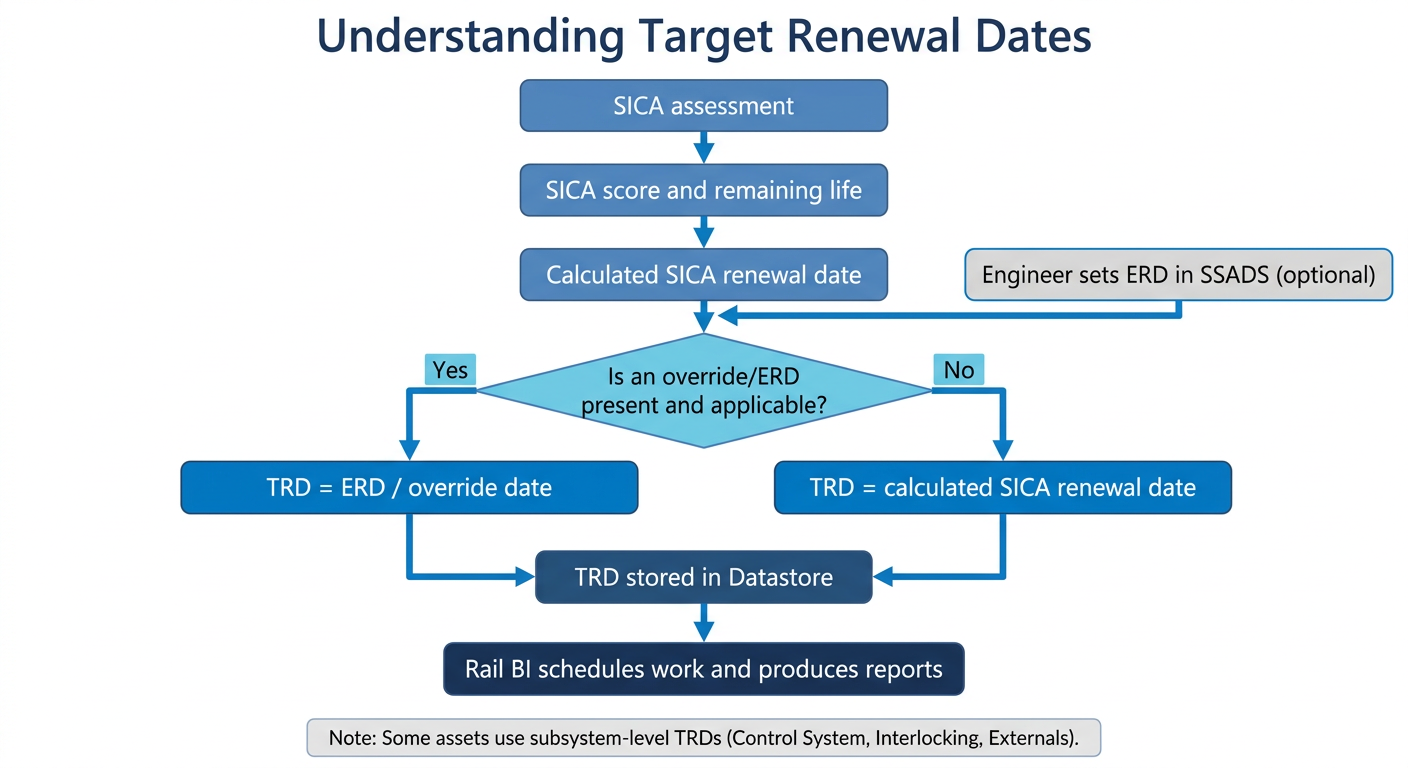
Summary
- SICA scores produce remaining life outputs.
- Remaining life and degradation rules produce a calculated SICA renewal date.
- ERDs capture engineering judgement when a different plan is required (often set in SSADS, and/or managed as subsystem-level overrides in the platform).
- TRD is the planning date, typically “override if present, otherwise calculated”.
- Datastore stores renewal date values so they can reliably feed Rail BI planning and reporting.