User Dashboard
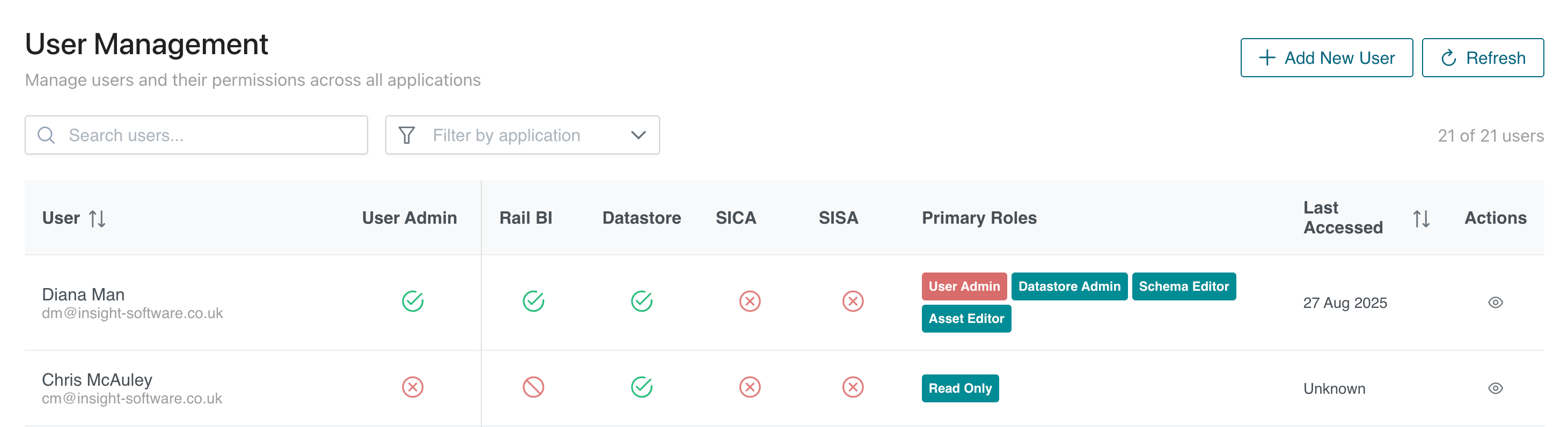
The user dashboard is a central location for user management within Rail BI / Datastore / SICA / SISA.
This dashboard allows user administrators to create a new user, edit users or amend existing permissions.
User / Application Columns
These columns shows user information and which applications they have access to.
- The User column displays both the users name and email address.
- The User Admin column indicates whether the user has user administration permissions.
- Each of the Application columns show if the user has access to that application.
Primary Roles
This column shows at a glance which roles the user has assigned.

Each application is shown in a different colour.
- Red items are User Administration permissions.
- Teal items are Datastore permissions.
- Green items are SICA permissions.
- Grey items are SISA permissions.
Last Accessed
This column shows the last time that the user account was used to access an application.
Actions
Each row has an actions column. Clicking on the view option opens the user profile view.
Searching Users / Filters
Users can be searched by name, or filtered by application access.

To search for a user, enter their name or email address into the search field.
To filter by application access, click on the dropdown and select which applications to filter by.